From Ink to Insight: Why I Stick with Paper and Gemini
When you’re deep in a technical session at a client site, focus is your most valuable asset. I’ve always preferred the reliability of a ballpoint pen and a standard notebook to stay engaged with the task at hand. However, for a long time, I looked at those fancy “paper-like” digital tablets—brands like reMarkable, Supernote, or Boox.
They are incredibly appealing. The idea of a sleek, distraction-free digital canvas is tempting, and they certainly look the part in a professional setting. But I had to ask myself: Do they actually add more to what I need?
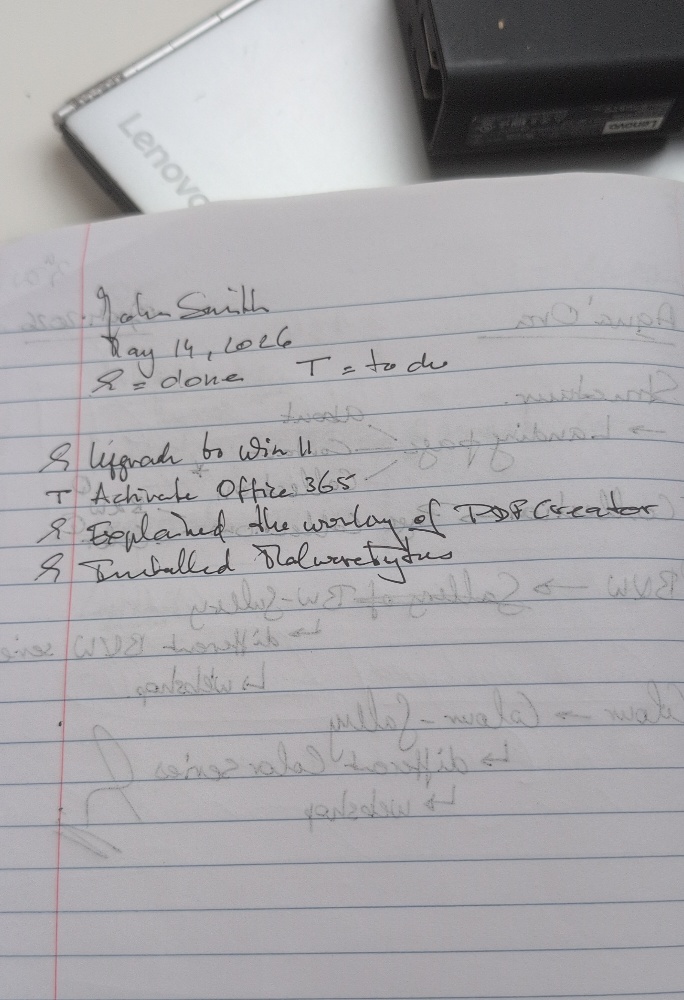
What I need is a system that handles “field shorthand”—notes that are hurried, technical, and definitely not neat—and turns them into two things: a precise entry for my own database and a professional summary for the customer.
I found that the most powerful “digital” tool isn’t a new device; it’s the AI I already have. By using Gemini to process photos of my handwritten notes, I get the best of both worlds without the $600 price tag.
The Workflow: Transforming a Scribble
Here is a real-world example. I take my rough notes from a session and let Gemini do the heavy lifting of deciphering and formatting.
Technical Service Summary: John Smith
Date: May 14, 2026
Completed Actions
- Operating System: Successfully performed a full upgrade to Windows 11.
- Training: Provided a functional walkthrough of the PDF Creator software.
- Security: Installed and configured Malwarebytes for system defense.
Outstanding Items
- Software Licensing: Office 365 activation is still required and scheduled for follow-up.
Why This Beats a Digital Tablet
While those fancy tablets are “cool,” they often struggle with the reality of a busy workday. Here is why the Pen + Gemini combination wins for me:
- Superior Deciphering: On-device OCR (text recognition) on tablets is often “hit or miss” with messy handwriting. Because Gemini understands context, it knows that “Win 11” means Windows 11 and doesn’t just read letters; it understands the work. In fact, there are moments when I look back at a scribble and can’t even decipher my own handwriting—yet Gemini scans the context of the technical task and gets it right every time.
- Dual-Purpose Output: In one move, I have a digital transcription ready for my internal database (so I always know exactly what I did at a client’s site) and a polished, professional email ready to send to the customer.
- Zero Friction: There’s no battery to charge, no glass to break, and no “wake-up” time. A ballpoint pen is always at 100% battery.
- Engagement Over Documentation: Writing on paper allows me to stay present with the client. I’m not “playing with a gadget”; I’m documenting their system.
The Verdict
The appeal of a reMarkable or a Supernote is real, but for my workflow, they are a solution in search of a problem. By pairing the oldest technology (pen and paper) with the newest (Gemini), I’ve created a documentation pipeline that is faster, more accurate, and more flexible than any specialized tablet on the market.
My messy notes stay in my notebook, but my digital records—and my clients’ summaries—stay perfect.