Separating Fact from Fiction: Is Your VPN Tracking You, and What About P2P?
We’ve all been there: you’re trying to make the best decision for your digital privacy, and a well-meaning friend drops a “security tip” on social media that turns your plans upside down.
Recently, a client told me that a Facebook friend warned them not to use a VPN because it records everything you do, suggesting they use P2P instead.
It sounds scary, but is there any truth to it? The short answer is no, but with a few crucial caveats. Let’s break down exactly how VPNs, P2P networks, Onion browsers, and private email actually work so you can navigate the web safely.
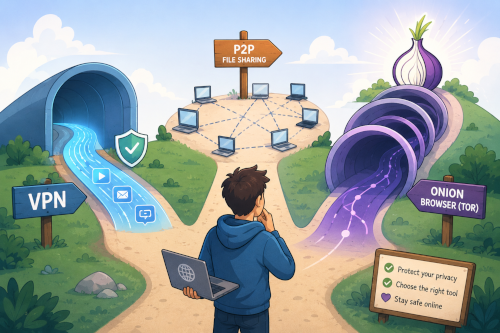
1. What is a VPN vs. What is P2P?
To understand why this advice is misguided, we have to look at what these technologies actually do. They aren’t even competing solutions; they are completely different tools.
What is a VPN?
A Virtual Private Network (VPN) creates a secure, encrypted “tunnel” between your device and a secure server operated by the VPN provider.
- How it protects you: All your internet traffic travels through this tunnel. To your Internet Service Provider (ISP)—the company you pay for internet access, such as AT&T, Frontier, or Verizon—as well as hackers on public Wi-Fi, your data looks like unreadable gibberish.
- The result: Your actual location (IP address) is hidden, and your internet activity is shielded from the outside world.
What is P2P?
P2P stands for Peer-to-Peer. It is a network architecture where individual computers (peers) connect directly to each other to share files, rather than downloading them from a central server. (Think of BitTorrent or old-school networks like LimeWire).
- The Reality: P2P is not a privacy tool. In fact, when you use a P2P network, your IP address is openly broadcasted to every other “peer” downloading or uploading that same file.
⚠️ The Verdict on the Claim: Telling someone to use P2P instead of a VPN for daily privacy makes no sense. It’s like recommending a megaphone instead of a private phone line.
2. Why the Claim “VPNs Record Everything” is Mostly False
The rumor that a VPN records everything you do stems from a misunderstanding of how data routing works.
When you use a VPN, you are essentially shifting your trust. Instead of letting your Internet Service Provider (AT&T, Frontier, Verizon, etc.) see which websites you visit, you are handing that connection to the VPN provider. Technically, a VPN could see your traffic if they wanted to—but premium, privacy-focused VPNs choose not to.
Reputable VPN providers operate under a strict No-Logs Policy. This means their systems are specifically engineered not to save your browsing history, connection timestamps, or IP addresses.
To prove this isn’t just marketing speak, the best VPN companies subject themselves to independent, third-party security audits (by firms like Deloitte or PwC) to verify that their servers are running “RAM-only”—meaning no data is ever written to a hard drive, and everything vanishes the moment the server is rebooted.
3. The Catch: What VPNs Are Not Safe?
While the Facebook warning is wrong about the technology as a whole, it accidentally stumbles onto a real risk: not all VPNs are created equal.
If you are using a free VPN, your friend’s warning might actually be right. Running a massive global server network costs a lot of money. If a company isn’t charging you a subscription fee, they have to make money somehow.
Watch out for:
- Free VPN Apps: Many free apps on mobile app stores have been caught logging user browsing habits and selling that data to data brokers and advertisers.
- VPNs Built by Antivirus Companies: Some bundled VPNs often keep “connection metrics” or minimal logs that undermine total anonymity.
- Lack of Independent Audits: If a VPN provider has never allowed an outside security firm to check their code, you shouldn’t trust their “no-logs” claim.
The Golden Rule: If you aren’t paying for the product, you are the product. Stick to vetted, premium services (like NordVPN, Proton VPN, or ExpressVPN) that back up their privacy claims with real-world legal track records and independent audits.
4. Do You Always Need a VPN? (The Acronym Confusion)
A common point of confusion is whether you need to run a VPN 100% of the time, even when you’re away from home.
The primary reason we use a VPN on public Wi-Fi (like at a coffee shop or airport) is that anyone can sit on that same network and intercept your data, or set up a “fake” Wi-Fi hotspot to trick you into connecting.
Mobile data (4G/5G/LTE) is entirely different. When you switch off Wi-Fi and use your cellular data, your phone establishes a direct, encrypted link straight to your cellular carrier’s cell tower. In networking terms, this is a point-to-point connection. Because it is a closed, direct channel between just two endpoints—your phone and the provider—it cannot be attacked or intercepted by random hackers the way public Wi-Fi can. ### The “P2P” Mix-up This brings us to where the Facebook friend likely got confused. In the tech world, both of these concepts share the exact same abbreviation:
- Peer-to-Peer (P2P): A crowded room where multiple computers share files publicly.
- Point-to-Point (P2P): A private, direct link between two specific devices (like your phone and Verizon/AT&T’s cell tower).
Their friend likely read that a “P2P connection is highly secure against hackers,” meaning a point-to-point cellular link. They then mistakenly advised using peer-to-peer file sharing software for daily privacy.
While your cellular carrier can still see what websites you visit just like a home Internet Service Provider would, you are completely safe from local cybercriminals. If your main goal is simply avoiding hackers while out and about, using your mobile data is already highly secure without a VPN.
5. Going Beyond: Onion Browsers and Private Mail
If you want to elevate your privacy past a standard VPN, there are two other massive pillars of digital self-defense you should know about:
Onion Browsers (The Tor Network)
If a VPN is a single encrypted tunnel, an Onion Browser (like the Tor Browser) is a multi-layered security maze.
Instead of routing your data through one server, Tor bounces your traffic through three different volunteer-run servers (called “nodes”) across the globe. Each step peels away a layer of encryption (like an onion).
- The first node knows who you are but not where you are going.
- The middle node knows nothing.
- The final node knows where you are going but not who you are.
While highly anonymous, the Tor network is significantly slower than a VPN and isn’t ideal for daily video streaming, but it is unparalleled for absolute anonymity.
Encrypted Email
Standard email (like Gmail or Yahoo) is inherently insecure; providers can scan your messages to serve ads or train AI models.
Secure mail providers (like ProtonMail) use End-to-End Encryption (E2EE). This means your email is encrypted on your device before it even hits the internet, and only the recipient has the key to unlock it. Even the email company itself cannot read your messages.
The Bottom Line
Don’t ditch your VPN for file sharing networks. A high-quality VPN remains one of the easiest and most effective ways to protect your household from daily tracking, ISP snooping, and public network hackers. Just make sure you choose an audited, paid service that respects your data—because your privacy is worth the investment.